Look at the current trends across social media in 2026. Clients are constantly asking for incredibly complex cybersigilism, micro-realism portraits, and delicate fine-line floral sleeves. These modern styles demand extreme precision. You might spend three hours on your tablet drawing the perfect 5-inch geometric piece. You finally place the design on your client’s arm, they twist their elbow slightly, you give it one wipe, and suddenly the lines melt into a grey puddle.
This is the nightmare of stencil blur. It is easily the most frustrating problem a working artist faces today. Even with all the advanced ink and rotary pens available, if your foundational guide fails, the entire session becomes a stressful guessing game. A blurry start almost always leads to a compromised finish.
When a design smudges or disappears too quickly, it is rarely just about a heavy hand. The issue usually stems from a failure of the tools and the chemistry behind the application. If the foundation of your artwork is weak, you cannot expect the final needlework to be sharp. In this guide, we will break down the physical reasons why these blurs happen and explore how upgrading to a modern tattoo printer can transform your daily work from messy to masterful.
The Real Reasons Behind a Messy Stencil Transfer
Many artists immediately blame their own hands or the client’s skin type when a design smudges. But we must look at the physical and chemical reactions happening on the surface. When your stencil breaks down midway through a session, it almost always comes down to these specific material failures.
Too Much Moisture Floods the Carbon
Getting a clean imprint is a very delicate balancing act of moisture and pressure. The transfer gel you apply acts as a chemical anchor for the purple carbon. If you apply three thick drops of solution when you only need one small drop, the carbon has way too much liquid to absorb. It physically expands on the skin. This immediate expansion creates a fuzzy, bleeding line that makes it impossible to follow fine details. You want the client’s skin to feel slightly sticky to the touch, never wet or slippery.
Low-Quality Stencil Paper Fails to Hold
Not all supplies in the industry share the same manufacturing standards. A lot of budget paper uses a very weak wax binder. This means the carbon melts at the absolute slightest touch of body heat. When you apply cheap stencil paper to the skin, that weak wax cannot bite into the open pores of the epidermis. The design might look totally fine for the first five minutes, but as soon as you do your first wipe with green soap, the lines simply wash away. Professional grade sheets use a denser mix that actually locks into the skin.
How Hardware Upgrades Stop the Smudge
Shifting your attention from hand-tracing to digital output is a huge leap for any growing studio. Tracing a complex design by hand takes a massive amount of time, and human pressure is never perfectly even. Modern machines fix this physical inconsistency completely, giving you a perfect starting point.
Precise Heat Control in a Thermal Printer
If you use a standard office fax machine or a cheap copier, you are fighting a losing battle. Those old machines have terrible heat distribution, creating hot spots and cold spots across the page. That is why some lines look dark black and others barely show up at all. A professional thermal printer applies a steady, highly calculated temperature across the entire surface. Because the heat is even, the carbon melts at the exact same rate. This creates a solid, uniform line that strongly resists the dreaded stencil blur when you start working.
Translating Digital Data into Physical Lines
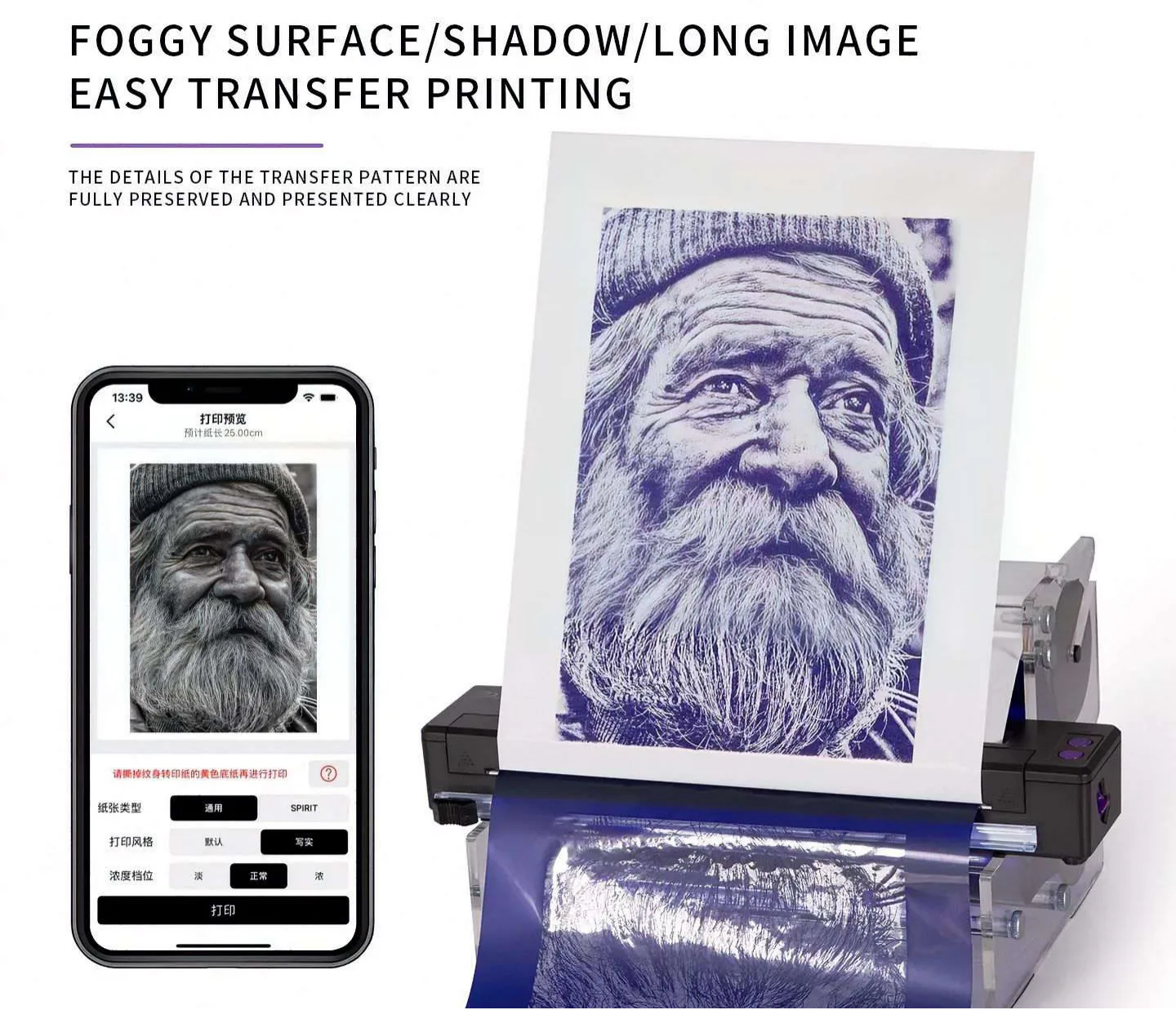
A machine built specifically for this industry, like the Yaba P19 Printer, changes how you process artwork. This device prints at 203 DPI, meaning the print head applies 8 exact dots of heat per millimeter. It does not guess. It translates the exact pixels from your tablet into physical heat patterns. This technology completely removes the human variable of tracing. You no longer have to worry about your pen slipping or your hand getting tired. The machine gives you an exact carbon copy of your digital art, making it much easier to execute single-needle work safely.
Speed and Consistency for Daily Appointments
Time is literally money in a busy shop. If it takes you 45 minutes to hand-draw a full back piece and it smudges on the first wipe, you have lost a huge chunk of billable time. A dedicated tattoo printer can spit out a highly complex A4-sized design in roughly 15 to 20 seconds. If you see five clients a week, saving 40 minutes per client gives you hours of your life back. You spend more time doing the actual needlework and less time praying that your lines will survive the session.
Choosing the Right Transfer Film for Complex Designs
You might own the sharpest machine available, but feeding it the wrong base material will still cause huge problems. The physical sheet you press against your client matters heavily. The industry is currently moving away from traditional opaque sheets toward modern materials for much better visual control and grip.
The Massive Advantage of Transparent Materials
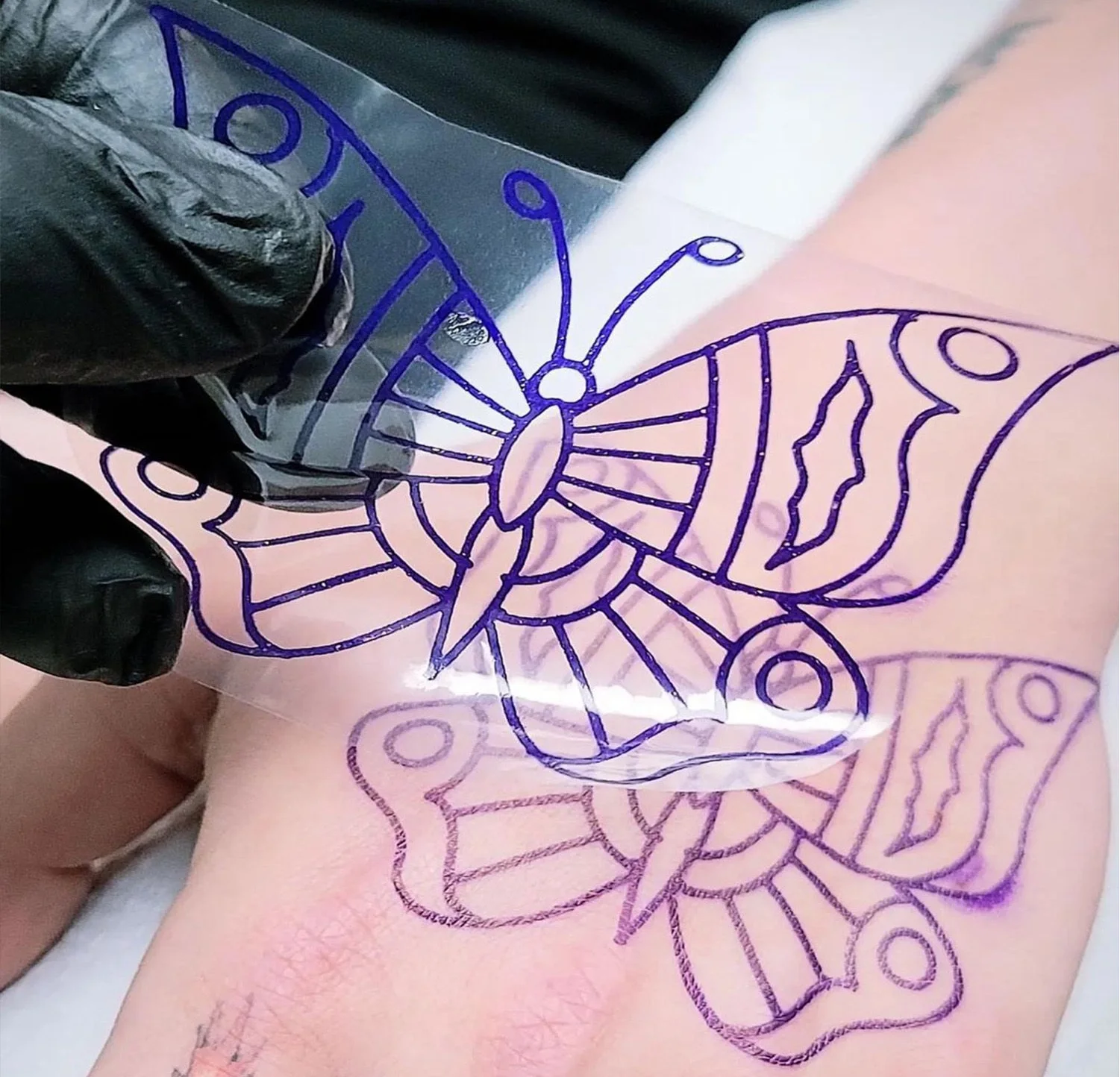
Traditional purple paper is totally solid. When you press it onto an arm, you are flying blind. You cannot see the skin underneath. A modern clear-cut stencil film changes the rules. Because the material is transparent, you can look straight through the sheet. You can see the flow of the muscles, dodge dark freckles, and line up complex cover-ups with zero guesswork. You place it perfectly the first time. This direct visual contact stops you from having to peel and replace the art, which is a major trigger for a messy stencil transfer.
Stronger Adhesion Means Less Wiping Damage
Clear film actually behaves differently than a standard paper sheet. It contours to the human body much more naturally. When you wrap a flat, rigid piece of paper around a curved forearm or a knee, the paper tends to fold and wrinkle. Those wrinkles create terrible blank spots in your design. Transfer film bends smoothly and grips the skin extremely tight. Because it hugs the curves without folding, the carbon stays exactly where you put it. Many artists report that a good film imprint can survive 30 or 40 heavy wipes during a long sitting.
Practical Steps to Keep Your Lines Intact
Getting the perfect imprint requires a strict daily routine. Even with the best equipment on the market, the way you prepare the canvas makes a massive difference.
- Shave a Much Larger Area: Hair is the enemy of carbon. Even tiny peach fuzz pushes the paper away from the skin, causing gaps. Always shave an area two inches larger than the actual design.
- Wait 15 Full Minutes: Do not start working right after peeling the paper off. You need to let the area dry completely. Use this time to pour your ink caps and set up your needles. A wet outline will disappear immediately.
- Wipe Away, Not Across: When you clean excess ink from the skin, always dab gently. If you absolutely have to wipe, wipe away from your guide lines, never drag your paper towel across them.
- Avoid Over-Drying with Alcohol: Cleaning the skin is important, but using 99% alcohol can strip all the natural moisture away. If the skin is completely bone-dry, the carbon will not stick at all.
Conclusion
Creating a permanent mark on the skin requires extreme precision from the very first step. When you stop relying on cheap materials and outdated tracing methods, your entire daily workflow becomes drastically smoother. Dealing with constant stencil blur simply wastes your valuable time and hurts the final result of your art. By upgrading to a reliable thermal printer and using high-quality transparent sheets, you lock those fine lines securely in place from the first minute to the last wipe. Your clients deserve highly precise artwork, and you deserve tools that actually work with you. If you want to upgrade your studio gear and stop worrying about your guide lines disappearing, please contact Yaba today at sale3@yabatattoosupply.com to find the exact equipment your business needs.
FAQs
Q: What is the main cause of stencil blur on the skin?
A: Using too much moisture or cheap stencil paper causes the carbon to bleed into the skin immediately.
Q: Can any standard office machine work as a tattoo printer?
A: No. You need a specialized thermal printer that applies even heat for a crisp stencil transfer.
Q: Why should artists switch to using clear transfer film?
A: Clear transfer film lets you see the skin underneath, preventing placement errors and holding carbon much longer.