A cover-up changes the sheet. So does a gap between two existing pieces, or a tight corner beside healed work. You need the old tattoo in view while you line the new design up. That is a clear film. Bare skin, and a sheet that only has to carry the design, stays on regular thermal paper.
Yaba sells both. The listing title separates them. Purple thermal paper and clear film are two orders.
Decide whether this stencil must show the skin underneath
Cover-ups and gap fillers
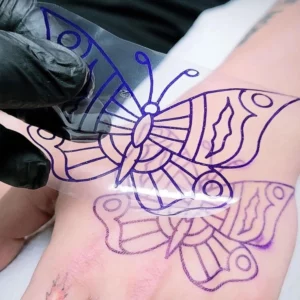
On bare skin, the stencil puts the design where you already planned it. On a cover-up, the old tattoo is part of the placement. You line a new shape up against lines, shading, or a gap that is already there. An opaque sheet hides that reference the moment it touches the skin.
Open our clear cut stencil film when seeing through the sheet is the point. The product title on that page is Tattoo Clear Cut Stencil Film Transparent Stencil Paper. Clear cut stencil film. Transparent stencil paper. Those words are the product.
A gap filler is the same test at a smaller scale. The new marks have to land between existing marks. If missing that gap would spoil the piece, visibility matters more than which purple sheet the studio usually loads. A filler on clear skin beside the old work, where you can place it from the edges, can stay on the regular thermal sheet.
Tight placement and a second stencil in a long session
A long session sometimes needs a second stencil in a small area. A date under a portrait. A small shape in a leftover gap. A repair of one line. Size alone does not call for clear film. The test is whether the skin underneath has to remain visible.
Bare skin for that second stencil? Stay on the sheet you already loaded. Work from earlier in the same session, or an older tattoo, under the new marks? Open the clear film. The page names the film. Placement stays with the method the artist already uses.
Keep regular thermal paper when the sheet does not need to be seen through
A first stencil on bare skin
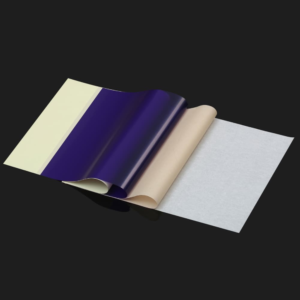
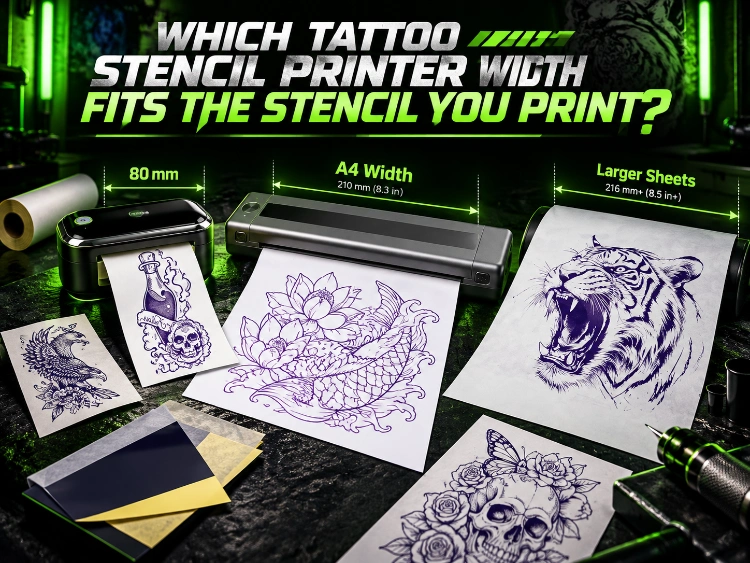
A first stencil on unmarked skin can use an opaque sheet. Our purple thermal stencil sheets are purple dye thermal stencil paper. The page says this paper is not the inkjet option. The sheet size in that description is 8.5″ x 11″ thermal transfer sheets.
Purple. Thermal. Letter size. For a thermal transfer. Choose it when you can place the design without seeing the skin through the paper. A cover-up you have already mapped from the edges of the old tattoo can stay on this sheet too. Clear film is for the stencil that itself has to stay see-through.
Our 30 m thermal roll describes 30 m thermal transfer sheets. Same family of thermal transfer paper. Roll length, where the cut sheets are 8.5 by 11 inches. Pick the roll when the printer feeds a roll and the stencil can be opaque. Pick the cut sheets when the printer feeds a sheet of that size. The clear-film title is a third product.
Printer compatibility still decides the paper
“Not the inkjet option” is a printer decision. The purple sheet is thermal stencil paper. Inkjet stencil paper is a separate product. Our inkjet stencil paper page says it is for Epson EcoTank model printers.
Keep the purple sheet with a thermal stencil printer. Keep the EcoTank sentence with the inkjet product.
Match the paper to the machine already on the bench. A thermal stencil printer stays with the purple sheets or the 30 m roll, unless this particular stencil has to be transparent. An Epson EcoTank bench follows the inkjet listing. The clear film title identifies a transparent stencil paper. Read your printer against the paper listing in the cart, and note whether that printer is thermal or an EcoTank.
Separate a clear film from a full transfer-paper set
The title joins film and transfer paper
The clear listing’s title puts several names in one line. Tattoo Clear Cut Stencil Film Transparent Stencil Paper. Clear cut stencil film and transparent stencil paper are both in that title. That is how you pick this listing over purple dye thermal stencil paper.
“Film” and “stencil paper” share one product name. That name chooses the see-through listing. It leaves the pack itself for the option selected on the page. Film on its own, and film plus a stack of transfer sheets, arrive as different packs. Read the selected option before you pay.
The pack in the cart still has to be read
Open the listing. Read the option that is actually selected. “Paper” in the title is the product family. “Film” in the title is the see-through layer. The selected option is the pack.
Already holding thermal sheets, and only needing a transparent layer for cover-ups? The selected option has to match that. Needing the sheets as well? The selected option has to include them.
Reorder the regular paper from the purple sheet page. Purple dye thermal stencil paper. Not the inkjet option. 8.5″ x 11″ thermal transfer sheets. The 30 m listing is the roll form. Neither description is the clear-film title. Reorder the product that matches the job you just did.
Check what the product page states before ordering
What the title actually names
Read the title as a label. Tattoo Clear Cut Stencil Film Transparent Stencil Paper names the clear, transparent stencil product. Purple dye thermal stencil paper names the regular sheet. 30 m thermal transfer sheets names the roll. Epson EcoTank model printers names the inkjet path.
Four labels. Four orders.
A cover-up that needs a see-through sheet starts at the clear-film title. A first stencil on bare skin starts at the purple sheet or the roll, depending on whether the printer takes sheets or a roll. An inkjet bench starts at the EcoTank sentence. Mix the labels and the parcel can arrive as paper the printer on the bench was never going to run.
What you still confirm on the listing
The clear-film page gives the product title. Before you order, confirm the pack that is selected, the printer you expect to run it on, and how many sheets or rolls you need. Placement over an old tattoo stays with the artist’s own method.
On the purple sheet, confirm you are ordering the thermal paper. The page already separates that sheet from inkjet work: “not the inkjet option” on the thermal sheet, and the EcoTank sentence on the inkjet product. On the roll, confirm that 30 m thermal transfer sheets match the feed you have. The 30 m sentence gives length. Read the roll width on that listing against the printer that will run it.
Conclusion
See-through stencil, clear film. The listing to open is titled Tattoo Clear Cut Stencil Film Transparent Stencil Paper.
Opaque stencil on a thermal machine: purple dye thermal stencil paper, in 8.5″ x 11″ sheets, or 30 m thermal transfer sheets. Inkjet bench: the product named for Epson EcoTank model printers.
Then read the pack that is selected. The clear-film title joins film and stencil paper. The option on the listing tells you what arrives.
For a quote, send the printer you already use, whether the stencil has to be transparent, the sheet or roll you need, and the quantity.
FAQs
Q1: Is the clear film the same product as the purple thermal sheet?
A1: Two titles. One is Tattoo Clear Cut Stencil Film Transparent Stencil Paper. The other is purple dye thermal stencil paper, sold as 8.5″ x 11″ thermal transfer sheets, with a separate listing for 30 m thermal transfer sheets.
Q2: Can the purple sheet go through an inkjet printer?
A2: The purple sheet page says it is not the inkjet option. The inkjet stencil product is the one described for Epson EcoTank model printers. Thermal paper stays with a thermal stencil printer. The EcoTank product stays with that inkjet path.
Q3: Where do I learn how to place the film over an old tattoo?
A3: The page titles the product as clear cut stencil film and transparent stencil paper. Place the stencil with the method you already use. Use the listing to confirm the transparent product and the pack you meant to buy.