Wartung von Tätowiermaschinen: Was sollten Sie zuerst überprüfen?

Die Wartung einer Tätowiermaschine sollte mit einer Funktionsprüfung nach dem Stillstand beginnen, nicht mit einem Reparaturversuch. Zunächst sollte geprüft werden, ob die Maschine noch normal funktioniert: Vor der nächsten Sitzung sind der Zustand der zugänglichen Teile, Kabel- und Batterieanschlüsse, Geräusche, Geschwindigkeit und Nadelbewegung zu überprüfen. Falls sich etwas verändert hat, sollte die Maschine gestoppt und das genaue Modell sowie die Symptome ermittelt werden, anstatt mit einer möglicherweise wartungsbedürftigen Maschine weiterzuarbeiten.
Eine praktische Wartungsroutine hält die Maschine in einem sicheren Rahmen. Der Künstler kann das Äußere überprüfen, Verschleißteile entfernen, nur die vom Hersteller freigegebenen Bereiche reinigen, die Maschine ordnungsgemäß lagern und Nachbestellungen für die Beutel planen, bevor der Vorrat zur Neige geht. Interne Reparaturen, Demontage und alle Arbeiten, die nicht in der Bedienungsanleitung beschrieben sind, sollten von einem qualifizierten Servicetechniker durchgeführt werden.
Beginnen Sie mit einer täglichen Checkliste für den Konsumstopp.
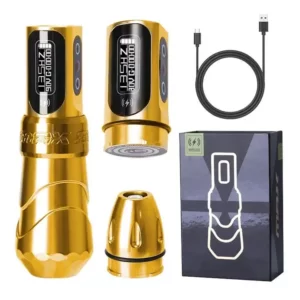
Eine regelmäßige Wartung ist nur dann sinnvoll, wenn sie Veränderungen frühzeitig erkennt. Führen Sie vor dem ersten Einsatz und nach der Reinigung denselben kurzen Check durch. Es geht nicht darum, alles direkt vor Ort zu reparieren, sondern darum, Veränderungen festzustellen und zu entscheiden, ob die Maschine noch einsatzfähig ist.
Äußeren Zustand, Kabel und Batterieanschlüsse prüfen
Beginnen Sie mit den sichtbaren und gefahrlos handhabbaren Teilen, wenn die Maschine vom Stromnetz getrennt ist. Achten Sie auf sichtbare Schäden, lockere Verbindungen, Ablagerungen in zugänglichen Bereichen und auf Kabel- oder Batterieanschlüsse, die nicht mehr fest sitzen. Wiederholen Sie die gleichen Prüfungen abwechselnd, damit auch kleine Unterschiede leichter erkennbar sind.
Trennen Sie das Gerät nach jedem Gebrauch vom Stromnetz. Wischen Sie die Außenseiten mit Reinigungstüchern ab. Entfernen Sie Verbrauchsmaterialien wie Patronen. Verwenden Sie eine weiche Bürste oder ein Tuch, um Tintenreste aus kleinen Zwischenräumen zu entfernen. Beachten Sie die Anweisungen des Herstellers, bevor Sie Reinigungsflüssigkeiten verwenden, und öffnen Sie das Gehäuse nicht. Versuchen Sie nicht, Verbindungen mit Gewalt herzustellen.
Achten Sie auf Veränderungen bei Geräuschen, Geschwindigkeit oder Nadelbewegung.
Verschmutzte oder schlecht geölte Maschinen können zu ungleichmäßiger Nadelbewegung führen. Dies verursacht unsaubere Linien oder fleckige Schattierungen. Eine Maschine kann auch sauber aussehen und dennoch anders klingen, mit veränderter Geschwindigkeit laufen oder eine unregelmäßige Nadelbewegung aufweisen. Jede anhaltende Veränderung sollte Anlass sein, die Maschine vor der nächsten Sitzung zu überprüfen.
Achten Sie auf Anzeichen wie lautere Geräusche, ungleichmäßigen Nadeleinzug oder langsamere Motordrehzahl. Dies kann auf verschlissene O-Ringe oder verschobene Antriebsstangen hindeuten. Diese müssen ausgetauscht werden. Vermeiden Sie den Dauerbetrieb der Maschine ohne geplante Pausen und verwenden Sie die für das jeweilige Modell vorgesehene Stromversorgung.
Ein einzelnes ungewohntes Geräusch genügt, um innezuhalten und der Sache nachzugehen. Notieren Sie sich, was sich geändert hat, wann es auftrat und ob das Problem mit einer bestimmten Tonabnehmerkassette, einem bestimmten Akku oder einer bestimmten Leistungseinstellung auftritt. Diese Informationen sind für einen qualifizierten Kundendienstmitarbeiter hilfreicher als die allgemeine Aussage, dass sich das Gerät „komisch anfühlt“.
Reinigung innerhalb der Herstellergrenzen
Reinigung unterstützt die Instandhaltung, sollte aber nicht zu einem unkontrollierten Reparaturprozess ausarten. Ziel ist es, Abfallmaterialien zu entfernen, zugängliche Oberflächen zu schützen und den Arbeitsplatz ordentlich zu halten, ohne Feuchtigkeit oder Reinigungsflüssigkeit in vom Hersteller nicht vorgesehene Bereiche zu bringen.
Trennen Sie die Einwegabdeckungen vom Maschinenkörper.
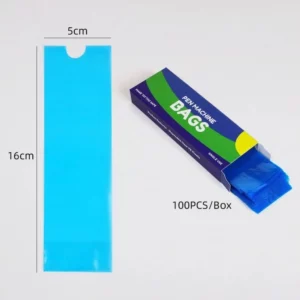
Die Tattoo-Klammer schützt die Klebefläche Ihrer Tätowiermaschine und verhindert, dass Tinte auf die Maschine gelangt. Sie reduziert außerdem effektiv die Geräuschentwicklung während des Betriebs. Die Einwegbeutel von Yaba enthalten 100 Stück pro Packung. Diese Beutel sind produktspezifisch und dienen nicht der Reparatur oder Reinigung.
Passform, Haptik, Öffnungsdesign und Verpackungskonsistenz sollten den Maschinen entsprechen, die Künstler tatsächlich verwenden. Das ist der richtige Test vor einer Großbestellung. Ist eine Hülle zu kurz, zu schmal oder lässt sie sich mit Handschuhen nur schwer öffnen, führt das zu wiederholten Problemen bei der Handhabung am Arbeitsplatz.
Erkennen, wann Reinigung zu einer Serviceentscheidung wird
Eine Reinigung ist nur dann zulässig, wenn der Hersteller dies erlaubt. Besteht das Problem nach der empfohlenen externen Reinigung weiterhin, verwenden Sie das Gerät nicht mehr und wenden Sie sich an den Kundendienst. Versuchen Sie nicht, durch ständiges Verändern von Leistungseinstellungen, Patronen oder Abdeckungen einen mechanischen Defekt zu kaschieren.
Das normale Verhalten der Maschine dient als Grundlage. Veränderungen in Geräusch, Geschwindigkeit, Wärmeentwicklung, Vibration oder Nadelbewegung deuten eher auf einen Wartungsbedarf als auf einen weiteren Reinigungszyklus hin. In einem professionellen Studio ist es ratsam, die Maschine außer Betrieb zu nehmen und eine Inspektion durchführen zu lassen, anstatt weiterzuarbeiten und dadurch ungleichmäßige Ergebnisse zu riskieren.
Instandhaltung in die Lager- und Nachbestellungsplanung integrieren
Die Wartung wird einfacher, wenn im Studio jedes Teil seinen festen Platz hat und es einfache Regeln für den Austausch von Verbrauchsmaterialien gibt. Die Aufbewahrung sollte die Maschine und ihr Zubehör zwischen den Anwendungen schützen und gleichzeitig verhindern, dass Einwegabdeckungen, Kartuschen und Reinigungsmittel vermischt werden.
Lagern Sie die Maschine und das Zubehör stets gleich.
Wählen Sie eine Aufbewahrungsmethode und wiederholen Sie diese. Schützen Sie das Gerät, wenn es nicht in Gebrauch ist, trennen Sie Einwegabdeckungen von unbenutzten Zubehörteilen und legen Sie Kabel, Batterien und Netzteile nach jeder Benutzung an denselben Platz. Eine einheitliche Anordnung erleichtert das Auffinden fehlender oder beschädigter Teile.
Ein kurzes Wartungsprotokoll kann diese Routine effizienter gestalten. Notieren Sie Datum, Maschinenmodell, beobachtetes Symptom und alle ergriffenen Maßnahmen und vermerken Sie, ob das Problem nach der Reinigung erneut aufgetreten ist. Das Protokoll ersetzt keine Serviceberichte, hilft dem Studio aber, die einzelnen Sitzungen miteinander zu vergleichen und wiederholte, provisorische Lösungen zu vermeiden.
Die Lagerung ist ebenfalls Teil der Wartung, da sie kontrolliert, wie oft die Maschine bewegt, angestoßen oder Unordnung ausgesetzt wird. Anleitung zur Maschineneinrichtung zu Spulen- und Rotationsdifferenzen kann einem Studio dabei helfen, klare Erwartungen an den Maschinentyp zu schaffen, wenn sich verschiedene Künstler einen Arbeitsplatz teilen.
Nachbestellungen von Einwegtüten bei Studio Use berechnen
Zählen Sie, wie viele Abdeckungen das Studio in einer normalen Woche verbraucht, und vergleichen Sie diese Zahl mit der Packungsgröße in der Produktbeschreibung. Die Einwegbeutel werden in Kartons mit 100 Stück verkauft. Die Nachbestellungsplanung sollte daher auf dem tatsächlichen Verbrauch des Studios basieren und nicht auf einer Schätzung anhand des Lagerplatzes.
Der Leitfaden zur Auswahl der ersten Tätowiermaschine ist hilfreich, wenn ein neuer Künstler den Maschinentyp verstehen muss, bevor er eine Wartungsroutine einrichtet. Für Künstler, die drahtlose Geräte vergleichen, ist die Anleitung für kabellose Tätowiermaschinen Dies erklärt, warum die Wahl von Akku und Stromversorgung in dieselbe Diskussion gehört. Behalten Sie diese Zusammenhänge im Hinterkopf; die Wartungsentscheidung hängt weiterhin von der jeweiligen Maschine ab.
Abschluss
Führen Sie zunächst eine Funktionsprüfung durch: Prüfen Sie vor der Reinigung oder Weiterverwendung den äußeren Zustand, die Anschlüsse, die Geräuschentwicklung, die Geschwindigkeit und die Nadelbewegung. Reinigen Sie nur innerhalb der vom Hersteller vorgegebenen Grenzen, verwenden Sie Einweg-Maschinenbeutel zum Schutz der Oberfläche und nicht zur Reparatur und lagern Sie die Maschine stets gleich. Besteht das Problem nach der ordnungsgemäßen äußeren Reinigung weiterhin, nehmen Sie die Maschine außer Betrieb und klären Sie mit einem qualifizierten Kundendienstmitarbeiter das genaue Modell, die Symptome und die Vorgeschichte. Prüfen Sie vor der Bestellung von Ersatzteilen oder der Vereinbarung eines Servicetermins das Maschinenmodell, die Stromversorgung und die benötigten Zubehörteile.
Häufig gestellte Fragen
Frage 1: Was sollte ich bei der Wartung einer Tätowiermaschine als Erstes überprüfen, wenn sie sich plötzlich anders verhält?
A1: Stellen Sie die Benutzung ein und überprüfen Sie den zugänglichen äußeren Zustand, die Kabel- und Batterieanschlüsse, Geräusche, Geschwindigkeit, Vibrationen und die Nadelbewegung. Öffnen Sie das Gerät nicht und arbeiten Sie nicht weiter, solange die Ursache unbekannt ist.
Frage 2: Kann ein Maschinensack Wartungsprobleme lösen?
A2: Nein. Die Produktbeschreibung für Maschinenschutzhüllen beschreibt Oberflächenschutz und Geräuschdämpfung. Eine Schutzhülle behebt keine mechanischen Probleme, ersetzt keine zugelassene Reinigung und garantiert keine Sicherheit.
Frage 3: Wann sollte ich die Tätowiermaschine nicht mehr benutzen und den Kundendienst kontaktieren?
A3: Beenden Sie die Arbeiten, wenn die Maschine nach den genehmigten äußeren Reinigungsschritten weiterhin Geräusche macht, sich bewegt, heiß wird oder sich anders verhält. Notieren Sie sich das Symptom und das Modell und bitten Sie anschließend einen qualifizierten Kundendienstmitarbeiter um eine Überprüfung.